Understanding your Pheeb CRM usage costs
A quick guide to how emails, texts, numbers and AI are billed on your account.
This guide explains the usage side of your Pheeb CRM account: what it is, what gets charged, and how to stay in control. Nothing here is a hidden fee. It is the cost of the messages, calls and tools you actually use.
The two parts of your bill
Your account has two types of costs:
1. Your subscription. A fixed monthly amount for access to the platform. It does not change with how much you use it.
2. Usage. A pay-as-you-go amount for things that cost money every time they run, like sending an email or a text, or using an AI feature. You only pay for what you use.
Think of the subscription as line rental, and usage as the calls and texts on top.
How usage billing works: your wallet
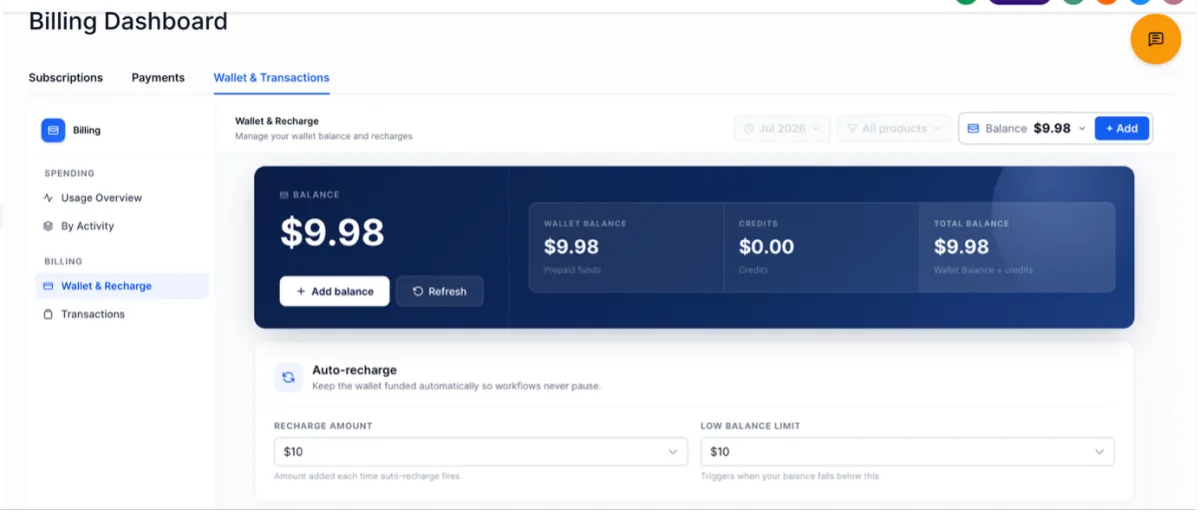
Usage is paid from a wallet, a prepaid balance held in your account. Each time you send an email or a text, a small amount is taken from that balance.
• You top the wallet up in advance.
• As you use services, the balance goes down.
• When it runs low, it tops up automatically so your sending is never interrupted (more on this below).
• You can see your balance and recent charges anytime in your account.
Where to find your billing
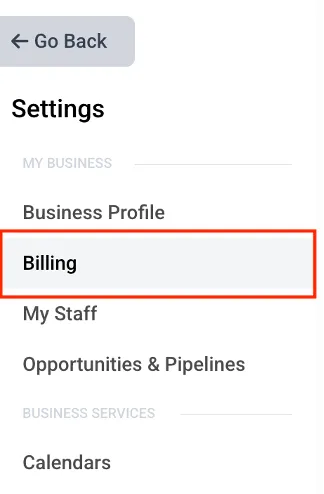
1. Open Settings in your account menu.
2. Click Billing.
3. This page shows your wallet balance, an Add Funds button, and a full history of your charges.

Auto top-up
So a broadcast or a busy day is never cut off mid-send, the wallet refills automatically when it drops below a level you set. For example, if it is set to add $10 whenever the balance falls under $5, the system tops it up and carries on.
Auto top-up only changes when you pay, not how much. You are only ever charged for usage you have actually had.
What you get charged for
You are charged per unit: one email, one text segment, one minute of calling, and so on. The live rates are shown in the rate card below.
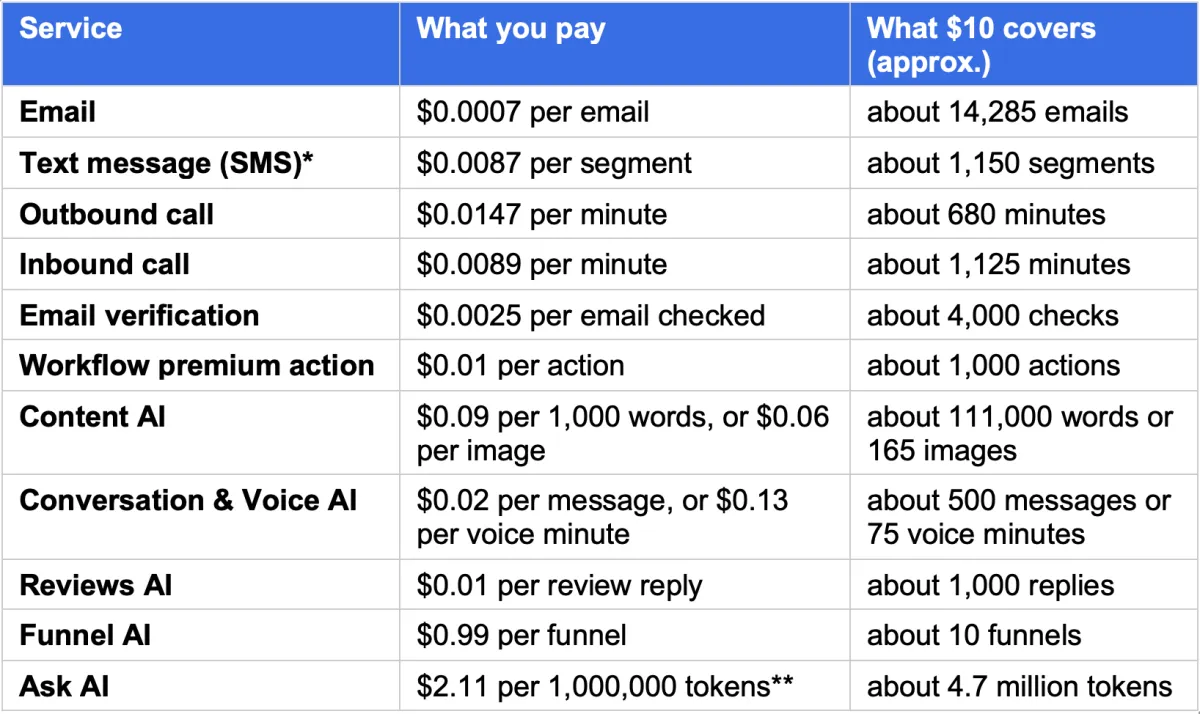
SMS is shown for US and Canada; rates vary by country, and a long text counts as more than one segment. * A token is a small chunk of text the AI reads or writes, so for everyday use the Ask AI cost is very small. Phone numbers are rented separately, usually a small monthly fee per number. The $10 figures are rounded to give you a feel for value. Prices were correct at the time of writing; your billing page always shows the current rates.
What each one means in plain terms:
• Email: each email you send. Priced per email, a fraction of a cent each.
• SMS and MMS: each text. Longer texts count as more than one segment, so they cost a little more.
• Phone number: a small monthly rental for each number you send from or call from.
• Calling: charged per minute, inbound and outbound.
• AI features (where enabled): charged by use, for example per minute of AI voice or per AI action.
The figures in the examples below are illustrative, to show how the maths works. Your real cost comes from the live rate card and your own volumes.
Worked examples
These show how usage adds up. They are examples, not live prices.
Light month. 500 emails, 200 texts, 1 phone number. Illustrative usage: roughly $8 to $12.
Typical month. 3,000 emails, 1,500 texts, 1 phone number, some AI call handling. Illustrative usage: roughly $40 to $70.
Heavy month. 15,000 emails, 6,000 texts, 2 phone numbers, regular AI call handling. Illustrative usage: roughly $180 to $300.
To estimate your own figure: number of messages x the per-unit rate on the rate card, plus any number rental.
Staying in control
• Check your balance and usage in your account whenever you want. Nothing is hidden.
• Before a large email or text broadcast, estimate the cost first: contacts x the per-unit rate.
• Keep auto top-up at a sensible level so refills are small and steady rather than large and surprising.
• If you are unsure what something will cost, ask us before you send.
FAQ
Why is there a usage cost on top of my subscription? Because messages, calls and AI genuinely cost money each time they run. The subscription covers the platform. Usage covers what you send through it, and you only pay for what you use.
Can my wallet run out mid-send? No. Auto top-up refills it before that happens, so sending is not interrupted.
Do unused funds disappear? No. Wallet funds stay as balance until you use them.
Where do I see what I have spent? In your account billing area, which shows your balance and a record of every charge.
A charge looks wrong. What do I do? Contact us and we will walk through it with you.